Create school-level user accounts
School Admins can create accounts for others, including bookkeepers, teachers, boosters, and other fundraiser organizers. You can also edit an existing account.
1. In the top-right corner, hover over the down arrow, then click Settings.
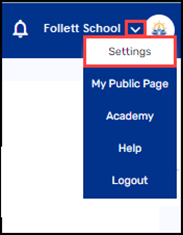
2. Under Account Management, select the type of account you want to create.
3. Do any of the following:
|
If you selected… |
Then… |
|---|---|
|
Teachers |
a. Click Create New Teacher. A pop-up appears. 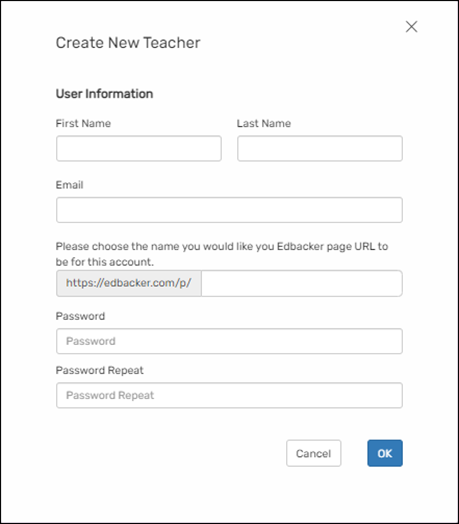
b. Fill in the information. Note: This URL becomes the new teacher’s Public Page URL. c. Click OK. |
|
School Admins |
a. Click Add Additional Account. A pop-up appears. 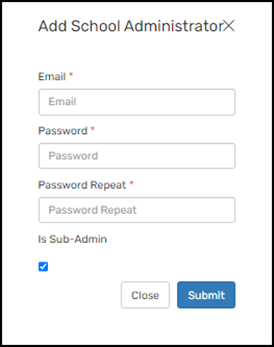
b. Fill in the Email and Password, then repeat the password. c. If you want this account to be a Sub-Admin, select the checkbox. Notes: Sub-admin accounts can manage school-level user accounts. d. Click Submit. |
|
Boosters |
a. Click Create New Booster. A pop-up appears. 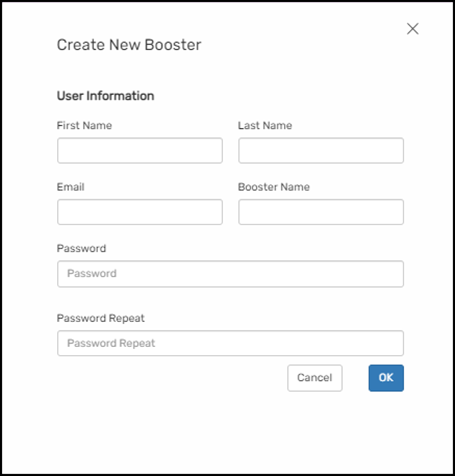
b. Fill in the information c. Click OK. |
|
Financial Account (Bookkeeper) Note: Only one Financial Account (Bookkeeper) can be added per school. |
a. Click Add Financial Account. 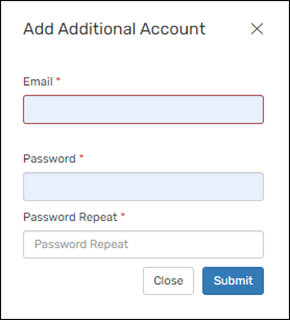
b. Fill in the information. c. Click OK. |
|
PTA Note: Only one PTA account can be added per school. |
a. Click Create New PTA. A pop-up appears. 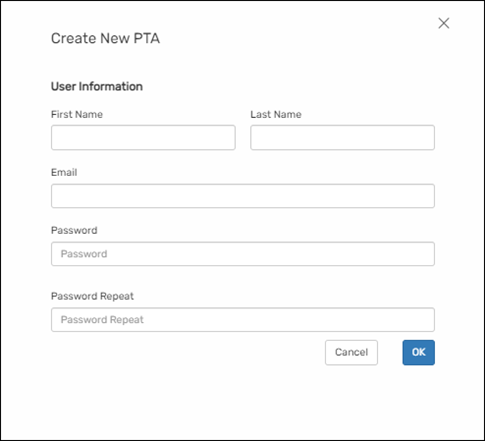
b. Fill in the information. c. Click OK. |
For additional help, contact techsupport@follettsoftware.com.